Neon Driver: Synthwave Racing
Reviews
Neon Driver delivers a satisfying arcade racing experience with its retro-futuristic style and catchy synthwave soundtrack. The controls are responsive, and the multiple camera angles add variety. Unlocking new cars and upgrades provides steady motivation to keep racing. The game is easy to pick up for quick sessions but offers enough depth to return to regularly.
Description
Game Introduction
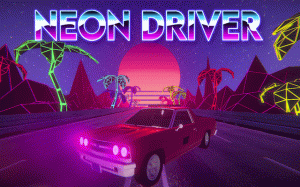
Neon Driver is an online arcade racing game set in a vibrant, synthwave-inspired world. Players drive along neon-lit highways under glowing skylines, blending retro 80s aesthetics with modern racing mechanics. The core objective is to race through tracks, earn points, and progress by unlocking new cars and upgrading vehicles. The game features an authentic synthwave soundtrack that enhances the immersive experience. It is designed to be family-friendly and accessible, making it suitable for players of all ages who enjoy casual racing fun.
How to Play
Getting started is simple. On PC, use the W key to accelerate, S to brake, and A or D to switch lanes. The pause button in the top right corner allows you to access the game menu, and the camera button lets you toggle between first-person, third-person, top-down, and hood views. On mobile devices, use the on-screen buttons to control your car. Pause and camera controls are also located in the top right corner for easy access during races. Earn points in every race to unlock new cars and purchase upgrades for your vehicle. The controls are intuitive, so you can focus on the racing experience.
Game Features
Neon Driver offers a polished racing experience with a distinct retro style. Features include a retro synthwave aesthetic with neon visuals, customizable cars and an upgrade system, multiple game modes, and three unique tracks. Flexible camera views, including first-person and top-down perspectives, allow players to choose their preferred view. The game also includes an authentic 80s electronic soundtrack that enhances immersion. The simple controls and varied tracks make it easy to pick up and enjoy during short breaks, creating a relaxing yet engaging atmosphere.
Tips for Success
To excel in Neon Driver, practice switching lanes smoothly to avoid obstacles and maintain speed. Learn the layout of each track to anticipate turns and optimize your racing line. Use the points earned from races wisely to unlock new cars and purchase upgrades that suit your driving style. Experiment with different camera views to find the one that gives you the best visibility and control. Regular practice will help you improve your reflexes and overall performance, making each race more enjoyable.
Compatibility
This H5 game runs smoothly on: • Desktop computers (Windows / Mac) • Mobile phones (iPhone / Android) • Tablets (iPad / Android) 🌐 Best experienced with Chrome, Safari, or Edge