Avatar Designer Puzzle Creator
Reviews
Avatar Designer Puzzle Creator is a delightful tool for anyone who enjoys character customization. The interface is clean and intuitive, making it easy to mix and match features. The real-time preview is a nice touch, and the ability to export with a transparent background is very useful for personal projects. It is a great way to express creativity without any complicated steps.
Description
Game Introduction
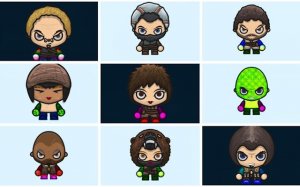
Avatar Designer Puzzle Creator is a free online tool that lets you design a unique digital avatar. Whether you want to express your personal style, create a character for a gaming profile, or simply have fun, this intuitive character builder makes it easy. With a focus on creativity and self-expression, it offers a wide range of customization options to bring your imagination to life. The tool is designed to be simple and enjoyable for users of all ages, providing a playful way to craft a virtual representation of yourself or a fictional character. Its puzzle-like approach to assembling features makes the process engaging and rewarding.
How to Play
Playing Avatar Designer Puzzle Creator is straightforward. Start by launching the tool in your browser. You will begin by selecting a base head shape. From there, you can customize the face by choosing different eyes, noses, mouths, and hairstyles. Next, pick a body type and an outfit that suits your character's personality. Finally, add arms and legs with various gloves, sleeves, pants, or shoes. Your avatar updates in real time as you make each choice. Once you are satisfied, you can export your creation as a PNG with a transparent background or as a JPG.
Game Features
Avatar Designer Puzzle Creator includes a massive customization library that offers a vast number of possible combinations. The detailed component system covers head, face, body, arms, and legs. High-quality export options support both PNG with a transparent background and JPG formats. The tool also features dual visual themes, allowing you to switch between light and dark modes. The simple, intuitive interface makes it suitable for users of all ages.
Tips for Success
To get the most out of Avatar Designer Puzzle Creator, experiment with different combinations of features and outfits to discover unique looks. Save multiple versions of your avatar to easily compare styles. Use the transparent PNG export for seamless integration into other projects or social media profiles. The key is to have fun and let your creativity guide you.