Personal Wardrobe Creator: Grunge Style Studio
Reviews
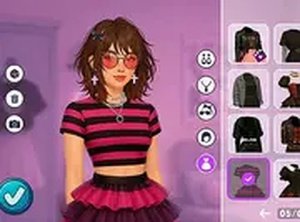
This browser-based studio stands out by removing all competitive elements, letting you focus purely on fashion. The wardrobe offers a solid range of grunge pieces, from flannels to combat boots, and the layering system works smoothly. Hairstyle and makeup options add depth to each look. The lack of time limits or scoring makes it a relaxing activity for anyone who enjoys personal style exploration. While the item selection is not enormous, the freedom to mix and match freely keeps the experience engaging. A worthwhile stop for alternative fashion fans.
Description
Core Concept
This browser-based experience puts the focus on personal expression through fashion. Instead of following trends or chasing high scores, you get to build outfits that reflect your own taste. The wardrobe includes pieces commonly associated with grunge and alternative aesthetics, such as plaid skirts, oversized flannels, ripped denim, and chunky boots. You can layer items, switch hairstyles, and apply makeup looks to create a complete ensemble. The interface updates instantly as you make changes, so you see the results of each decision right away.
Wardrobe Selection
The clothing options span several categories: tops, bottoms, outerwear, and accessories. Tops include band t-shirts and simple tanks, while bottoms range from ripped jeans to plaid skirts. Outerwear choices feature flannel shirts and denim jackets. Accessories like beanies, chokers, and bags add finishing touches. Hairstyles vary from messy buns to straight hair with bangs, and makeup includes darker shades like smoky eyes and deep lip colors. All items are designed to be family-safe and suitable for players of any age.
Creative Process
Building an outfit starts with selecting a base piece, then layering additional items to add depth. You might begin with a plain top, add a flannel over it, and finish with a beanie and boots. The game encourages experimentation—there are no wrong combinations. If a look does not work, you can undo individual changes or reset the entire outfit. This trial-and-error approach makes the experience relaxed and open-ended. The goal is not to win but to discover combinations that feel right to you.
Accessibility and Platform
Since the game runs directly in a web browser, there is no need to download or install anything. It works on both desktop computers and mobile devices with touchscreen support. The simple interface uses mouse clicks or taps to browse and select items. This makes it easy to pick up and play for a few minutes or spend a longer session refining a look. The lack of time limits or competitive elements means you can proceed at your own pace, making it suitable for casual players and fashion enthusiasts alike.
Compatibility
Faq
Do I need to create an account to save my outfits?
Can I play this game on a tablet or phone?
Are there any in-app purchases or ads?
How often is the wardrobe updated with new items?
Is this game suitable for young children?
Can I share my created outfits with friends?
Handpicked Games
Kitty Fashion Styling Adventure
Kids Coloring Book Fun
Anime Character Styling Studio
Creative Fashion Puzzle Designer
Valentine Animal Coloring Joy

Style Studio: Princess Makeover
Polished Style: Nail Design Workshop

Puzzle Crush: Parisian Hearts

Puppy Fashion Studio
Warm Weather Wardrobe Creator
Frosting Fantasy: Decorate Your Dessert