Pedal Rush 3D
Reviews
Pedal Rush 3D stands out for its clean 3D visuals and well-designed obstacle courses that gradually increase in difficulty. The controls are responsive, making it easy to steer through tight gaps. The high score system adds a friendly competitive layer that encourages replay. It is a solid choice for anyone looking for a quick, skill-based racing game in their browser.
Description
Course Navigation & Obstacles
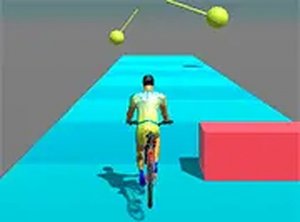
Pedal Rush 3D places you on a bicycle traveling through courses packed with barriers, cones, and moving traps. The core task is to steer left or right, speed up, or brake at the right moment to avoid crashes. Each course introduces new hazard arrangements that require careful timing. The game uses a 3D perspective to give you a clear view of the road ahead, helping you plan your path through tight spots.
Progression & Difficulty Curve
As you move forward, the courses become faster and more complex. New obstacle types appear, and the spacing between hazards shrinks. This gradual increase in difficulty keeps the experience engaging without feeling unfair. Players who master the early courses will find later stages demand sharper reflexes and better anticipation. The game tracks your progress, encouraging repeated attempts to improve.
Visual Design & Presentation
The game features a clean, colorful 3D style that makes the environment easy to read. Bright road markings and distinct obstacle shapes help you react quickly. The bicycle and rider animations are smooth, adding to the sense of speed. A full screen mode is available for those who want to minimize distractions and focus entirely on the road.
Competition & Replay Value
Pedal Rush 3D includes a high score system that lets you compare your best runs with friends. This simple competitive element motivates you to refine your technique and try different approaches. Because each course can be replayed many times, the game offers lasting appeal for players who enjoy perfecting their performance. The free-to-play browser format means you can jump in anytime without downloads.
Compatibility
Faq
What platforms can I play Pedal Rush 3D on?
Is there a way to pause the game during a course?
Does Pedal Rush 3D require any special software or plugins?
How are high scores saved in Pedal Rush 3D?
Can I change the control keys in Pedal Rush 3D?
Is there a way to practice specific courses in Pedal Rush 3D?
Handpicked Games

Lemonade Fruit Slicer Arcade

Vertical Climb Parkour Runner
Alien Planet Journey
Stickman Archer Target Challenge

Tiny Archer: Precision Arcade Game

Arcade Champion: Martial Arts Training

Hidden Boss Search Puzzle

Urban Explorer Quest Arcade

Red Boat Tap Quest
Desert Racing Arcade Adventure
Swing Adventure Arcade Fun