Table Tennis Rally Challenge
Reviews
Table Tennis Rally Challenge excels at delivering the core thrill of a real ping pong match without unnecessary complexity. The controls feel immediate, allowing players to focus on reading their opponent's movements. The AI provides a solid training partner that scales well with skill level. Career mode adds meaningful progression through unlockable cosmetics, though the real draw is the satisfying loop of quick rallies. It is an ideal choice for casual sessions or competitive local matches.
Description
Match Flow & Core Mechanics
Each rally begins with a serve, and players must return the ball using their paddle. The key is to anticipate the ball's trajectory and position your paddle accordingly. Success comes from mixing up your shots—sending the ball to the far corners or using a gentle drop shot to catch your opponent off guard. Matches follow standard scoring, where the first to reach a set point total wins the game.
Opponent Types & Play Modes
Players can challenge a computer opponent that adjusts its difficulty based on your performance. For a more social experience, local multiplayer allows two people to compete on the same screen. The AI opponent provides a consistent challenge for solo practice, while human matches offer unpredictable rallies that test adaptability.
Visual Style & Audio Feedback
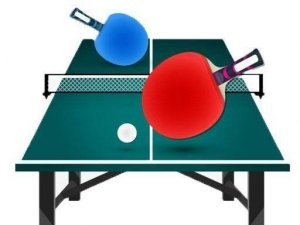
The game presents a clean, realistic table tennis court with detailed paddle and ball models. Sound effects, such as the distinct thwack of a smash or the softer sound of a spin shot, help players judge the type of hit. The visual clarity ensures that the ball remains easy to track even during fast exchanges.
Progression & Unlockable Content
A career mode lets players advance through a series of matches, earning points for victories. These points can be used to unlock new tables, paddle designs, or ball skins. This system gives a sense of accomplishment without requiring complex skill trees, keeping the focus on the core gameplay.
Skill Development & Strategy
Improvement comes from learning to read your opponent's positioning. A common tactic is to aim the ball to the side opposite where your opponent is standing. Mixing fast smashes with slower, spinning returns forces errors. Regular play helps develop muscle memory for timing and paddle movement.
Compatibility
Faq
Can I play Table Tennis Rally Challenge on a mobile device?
Does the game include online multiplayer?
How many different tables or environments are available?
Is there a tutorial for beginners?
Can I adjust the difficulty of the AI opponent?
What are the system requirements for playing on PC?
Handpicked Games

Vertical Climb Parkour Runner
Alien Planet Journey
Stickman Archer Target Challenge

Tiny Archer: Precision Arcade Game
Hexa Merge Number Puzzle

Cozy Merge Potion Puzzle
Hidden Boss Search Puzzle

Urban Explorer Quest Arcade

Red Boat Tap Quest

Desert Racing Arcade Adventure
Swing Adventure Arcade Fun