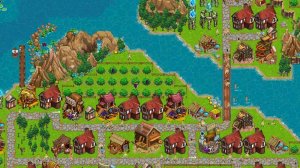
Urban Planning Simulator
Reviews
Urban Planning Simulator stands out for its detailed citizen simulation, where each resident's happiness directly impacts productivity. The branching tech tree encourages replayability, and the emphasis on efficient layout design keeps players engaged. While the learning curve is moderate, the tutorial and adjustable difficulty make it accessible. A solid choice for strategy fans who enjoy micromanagement.
Description
Core Gameplay Loop
Players begin with a small patch of land and a handful of resources. The first task is to construct a central gathering point, which draws wandering individuals to join the settlement. From there, building homes and setting up basic food production becomes the priority. As the population grows, more complex structures become available, each requiring careful placement and resource allocation.
Citizen Needs & Behavior
Each resident has personal requirements that must be met to remain productive. Hunger, shelter, and access to communal facilities influence their overall satisfaction. If needs are ignored, citizens may leave or stop working. This system encourages players to monitor individual well-being rather than treating the population as a single mass.
Technology & Progression
A branching research tree allows for customized development. Players can focus on agricultural efficiency, construction speed, or advanced utilities. Each choice opens new possibilities and closes others, making every playthrough feel distinct. Unlocking higher-tier buildings often requires meeting specific population or resource thresholds.
Layout & Efficiency
Space is limited, so planning the arrangement of roads, homes, and production facilities matters. Placing housing too far from food sources wastes time. Clustering related buildings reduces travel distances and boosts output. The camera can be rotated and zoomed to inspect every corner, helping players spot inefficiencies.
Compatibility
Faq
What platforms is Urban Planning Simulator available on?
Is there a tutorial for new players?
Can I save my progress mid-game?
Are there different difficulty settings?
Does the game have a sandbox mode?
How long does a typical game session last?
Handpicked Games

Color Match Arcade Puzzle

Tile Logic Puzzle
Tower Defense Quest

Strategic Rescue Planning Game

Precision Board Puzzle Challenge
Space Blocks 3D Puzzle

Mech Workshop: Idle Builder

Fantasy Card Quest: Strategy Adventure

Sky Flight Simulator 3D
Unfinished World Platformer

Friendly Character Merge Puzzle